Apple quietly add game-changing feature that lets you digitize literally any physical card


A new era of the iPhone is here, and with it, Apple has made some major (and important) changes to how the Wallet feature works. With iOS 27 out in the wild, we're finally getting to grips with the next generation of operating system that takes us through to the iPhone 18 lineup and the iPhone Duo.
As we fawn over our shiny new iPhone, there's plenty that's going on under the hood, while even those who haven't decided to upgrade can make the most of iOS 27.
We've already praised iOS 27 for fixing one annoying feature, but now, you can upgrade your Wallet to create custom passes.
What is an Apple custom pass?
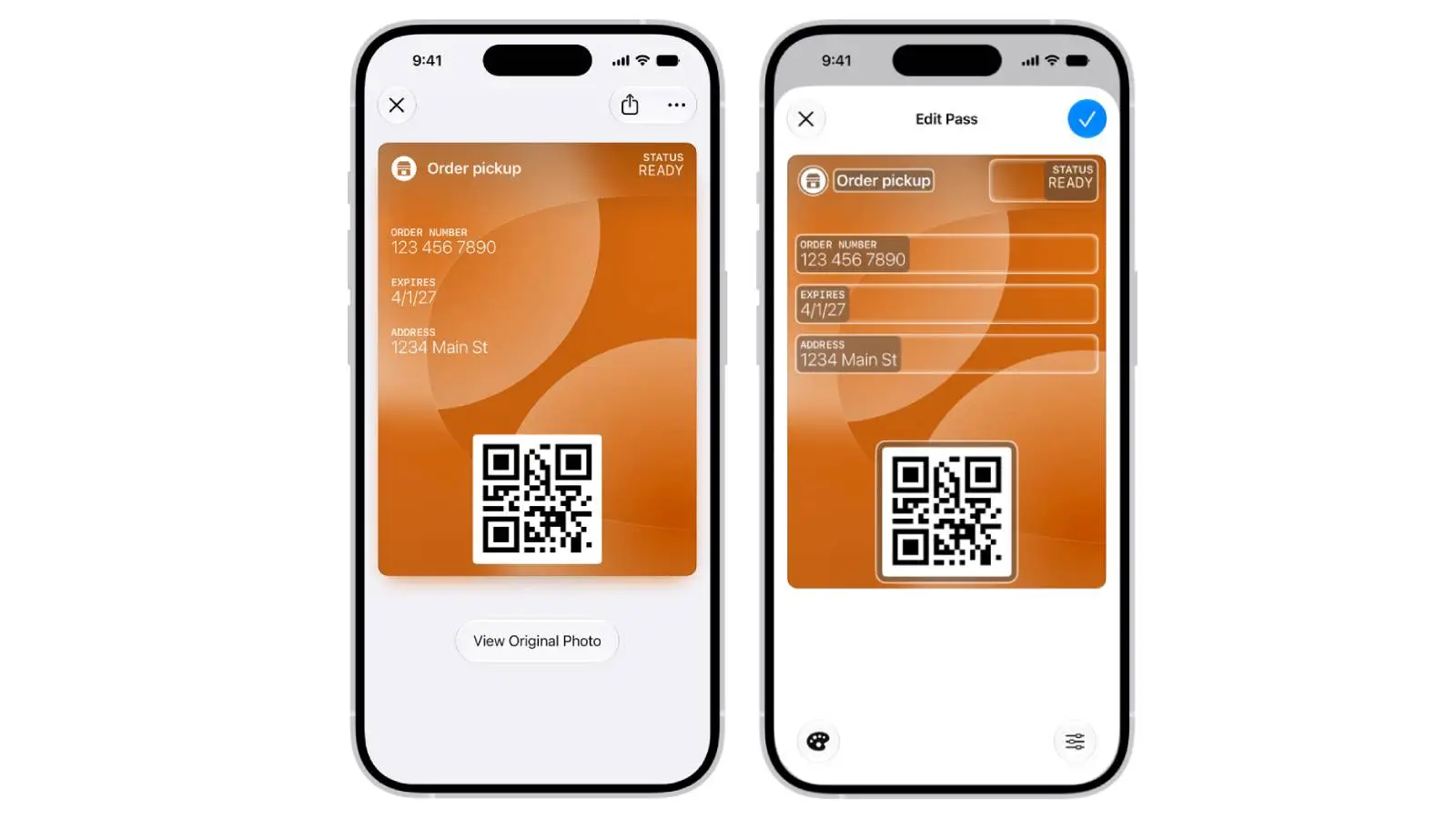
While some are lamenting Apple Intelligence's drain on your iPhone, there's the added bonus of creating custom passes. Even if there's no digital version of a ticket available for the Wallet app, Visual Intelligence will be able to scan a card and create a template that you can then adjust before putting it in your Wallet.
Advert
It's also possible to create custom passes manually, selecting from pre-existing templates of 'Membership', 'Event' or 'Custom'.
Apple claims it's as simple as scanning a barcode or QR code from a physical pass. Head to Wallet, tap the Add Card button, then select Create a Pass.
Selecting Create Pass Manually, you'll be able to choose a template, then edit details by tapping a specific field, then press Done.
To do it automatically, take a photo of your pass or ticket that contains a barcode or QR code, then tap Add to Wallet, and follow the instructions.
iPhone users praise Apple's custom pass...but there's a catch
This has already proved to be a divisive addition on the r/technology subreddit, with fans and critics sharing their various opinions on the change. One supporter wrote: "This is a welcome feature. My insurance provider doesn't even have a card feature inside their ‘app’ - you have to download a PDF on a website that's not made for mobile."
There are obvious advantages to this upgrade, although it's not without some drawbacks.
There's a potential problem, with several comments claiming certain places like Costco and LA Fitness require a physical card or one produced through their official apps. One disgruntled user added: "I used it for LA Fitness. After I scanned, the person looked at their computer and asked “was that from the LA Fitness app?” I said no and she had me scan again from the app. Cool feature but unfortunately not useful for certain places."
Another concluded: "I tried that with the Costco membership. They almost called a supervisor on me before I pulled out the actual membership card."
Others said they've been using the third-party Pass4Wallet, saying they're surprised Apple has taken so long to add official compatibility itself.
Notably, it appears that the likes of airport staff and security personnel might reject a custom pass because it doesn't look like an official version.
If they demand the original PDF or proprietary app, it defeats the point of having a quick-access custom pass.
That's not all, as certain digital store cards or high-security ticket apps have a rotating QR code to prevent fraud. Considering Apple's builder has a static barcode, it makes these custom passes once again useless.
While many welcome the change, Apple could still have some work to do.