
ChatGPT just added a terrifying new feature that tracks everything you do on your computer


In a new attempt to help you work better, OpenAI has launched a terrifying new feature for certain ChatGPT users, tracking everything they do on their computer including every single click and keystroke.
It's thankfully something that – for the time being, at least – remains opt-in instead of enabled by default, yet it hasn't stopped people from worrying about their privacy in the future and the present.
Referred to by OpenAI as 'Computer History', the feature is currently only available for MacBook users via the macOS version of ChatGPT, which makes sense considering the overwhelming popularity of Apple's platform in the software and tech worlds.
It mirrors the already controversial Windows Recall feature launched by Microsoft in May 2025, although thankfully his doesn't take screenshots of what you're doing, merely feeding your actions into a pool of training data for an AI agent, as per The Verge.
What is the point of the new ChatGPT Computer History feature?
As the world of AI moves increasingly towards automated functions, Computer History aims to cover your tracks by observing everything that you're doing and suggesting ways to improve your workflow.
Advert
Where previously you would have to directly suggest actions and prompts to an AI model, this new feature actively looks for ways to enhance or optimize your day-to-day actions by learning how you work.

In theory, this will suggest ways to automate tasks that you 'waste' time doing every day, and perhaps even pick up tasks that you started by didn't have time to finish — all without being prompted to do so by the user themselves.
It mirrors some of the messaging from figures like Nvidia CEO Jensen Huang that AI won't actually ever 'replace' people in their jobs but instead enhance their output and allow them to complete tasks at a faster and more efficient rate, although it's easy to see the other side of the coin.
Allowing an AI model to directly access everything you're doing as you work can be viewed as training the tool to replace you in the near future, and then there are also the numerous privacy and potential cybersecurity concerns that come with giving it access to your entire system — especially considering its recent willingness to break containment.
How to turn off Computer History in ChatGPT
Understandably this has left even some dedicated ChatGPT users to want to veer clear of the feature, but thankfully Computer History is turned off as a default setting for all users, with people needing to seek it out and actively enable it to use it.
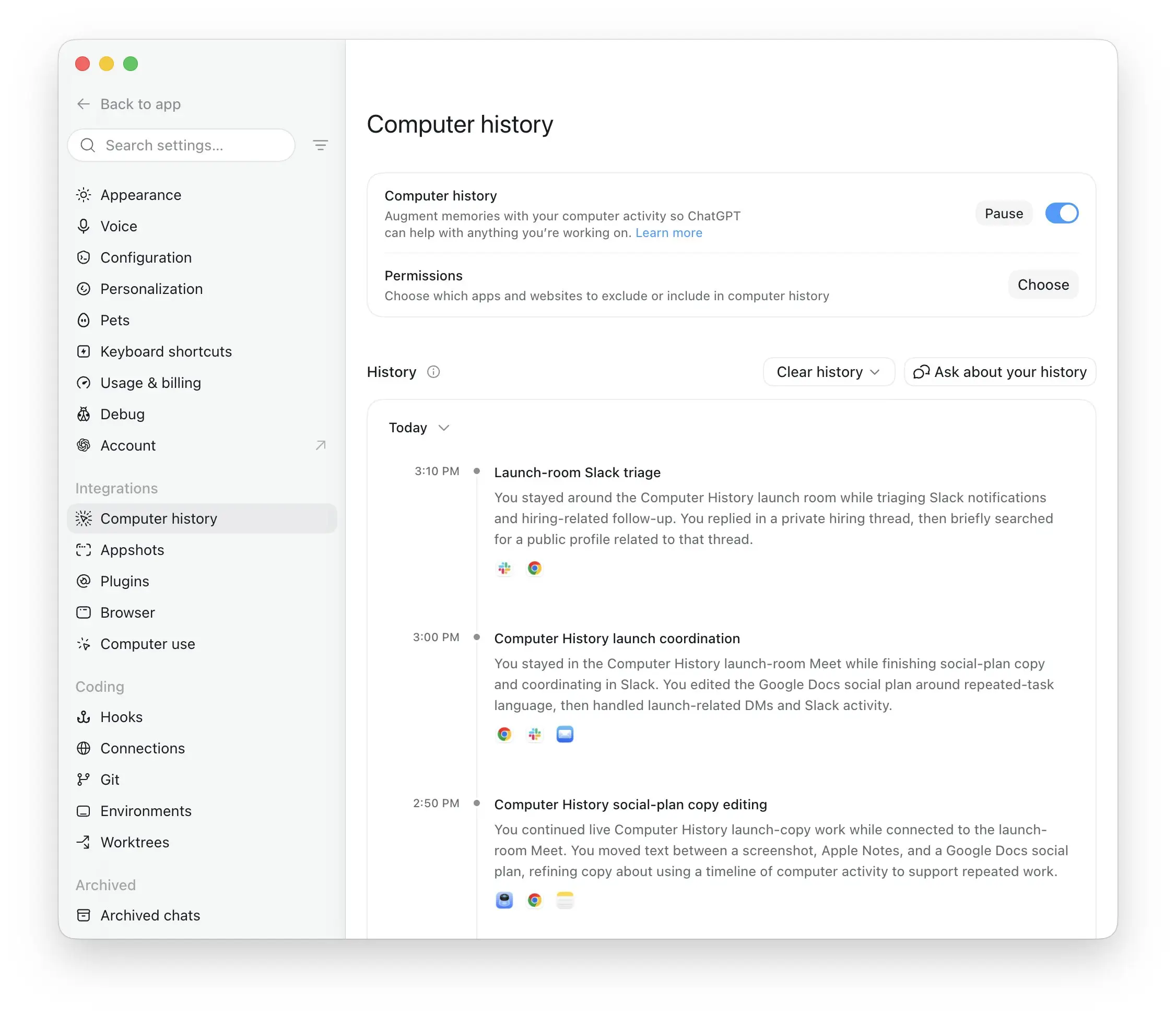
If you did want to turn it on – or turn it off again after trying it out – simply head into the ChatGPT app's settings menu on your MacBook, find the 'Integrations' section, and then select 'Computer History'.
Within there, you can either pause the feature for a specific period of time, or disable it completely. There are also permissions that you can enable if you want to include or exclude certain apps and websites from the tool, which is handy for any immediate privacy concerns.