Apple's 'move to iOS' app catapults into Google Play's top 40 list


Apple’s ‘Move to iOS’ app is proving to be popular as it catapults into the Google Play top 40 list.
The app helps people to easily move their data from an Android device over to Apple.
The app description explains: “Everything about iOS is designed to be easy. That includes switching to it. With just a few steps, you can migrate your content automatically and securely from your Android device with the Move to iOS app.
Advert
“No need to save your stuff elsewhere before switching from Android. The Move to iOS app securely transfers all kinds of data for you.”
It looks like a lot of people potentially received iPhones from Santa this year as the app grows in popularity, but what does it actually do?
How does the ‘Move to iOS’ app work?
The app has been around since 2015 and is available on Android app stores in order to streamline the move over to Apple.
Beforehand, people would need to rely on third-party services.
If you’re wanting to make the switch, you’ll first need to download the app on your Android phone, which will then walk you through transferring your data.
And there’s a lot of stuff you’ll be able to transfer.
This includes things like your contacts, message and call history, calendar, photo albums and videos, display and accessibility settings, web bookmarks, email accounts, WhatsApp messages and media and voice memos.
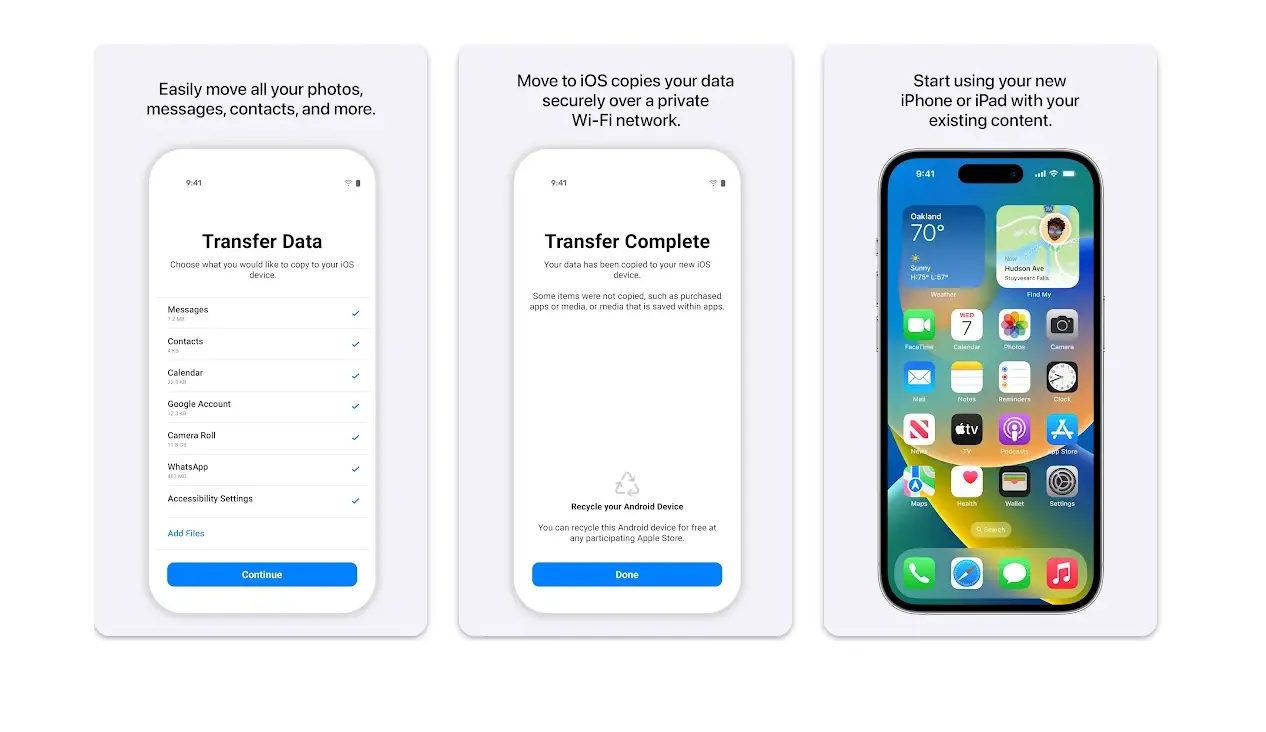
Some of your free apps will also be able to be transferred onto your new Apple phone.
In order for it to work, your device will need to be running Android 6.0 or later but you’ll be able to update your operating system before transferring the data across.
During the process, it’s best to keep both of the devices plugged in and near each other.
People have taken to the review section of the app on the Google Play store to share their own experiences of using it.
One user said: “Excellent app. Worked fine for me. Only issue is if your data to transfer is huge, it will take lot of time AND your iOS screen needs to remain ON, else it can fail. And the default screen timeout in iOS is 30 sec which cannot be configured during your first time device setup. So you'll have to sit and keep tapping the screen every 30 sec.”
And another added: “Switching from Android to iPhone has never been easier! This app is an absolute game-changer. It effortlessly transfers everything—contacts, photos, videos, apps, and most importantly, WhatsApp messages with all their details intact.”