
Instagram finally debuts game-changing rearrange feature users have 'been waiting for'


People have been asking for one particular feature to be added to Instagram for years, and the social media giant has now finally responded by introducing the ability to rearrange your grid.
While it might not be a big deal to everyone, there are plenty of Instagram users out there who carefully curate their grid to ensure consistency and an ideal look, with some even going as far to color match across their entire profile.
The social media platform has previously added features that allow you to pin certain posts to the top of your profile, and even last March debuted the ability to adjust the order or photos in a carousel post after it has already been shared.
This week, however, Instagram finally added a feature that many users have been waiting years for at this point, announcing the ability to reorder and rearrange your profile's photo grid 'any way you like'.
Instagram adds the ability to rearrange photos on your grid
As reported by 9to5Mac, the feature was announced by the official Instagram account on Threads — and it has already received significant fanfare as many are overjoyed to finally have the option to switch things up.
Advert
It will be especially useful for people who have photos that create a larger mosaic-like pattern on their profile, as this can be messed up by new posts that shift the placement when they're added to the grid.
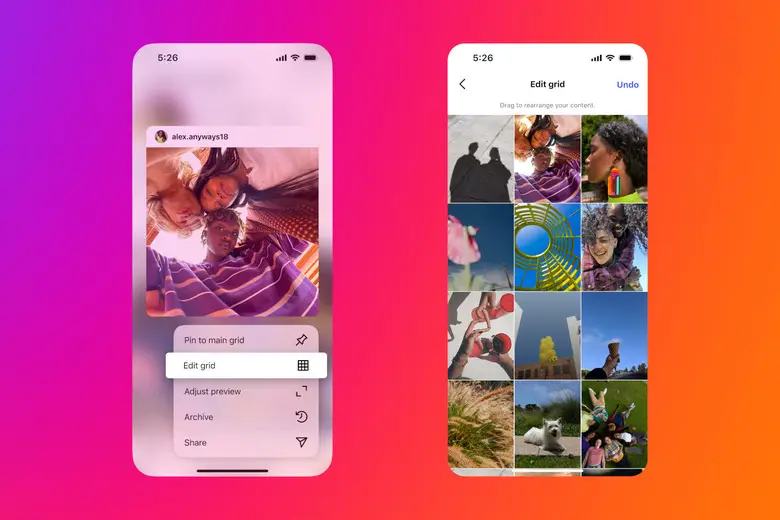
You can also use it to create groups of photos without stressing about a new post messing up the look of your profile, and it might perhaps lead some people to think less about what they share and post more spontaneously like the old days.
How to rearrange photos on your grid
Reordering photos on your grid is thankfully super easy, and can be completed in just a handful of steps:
- Long press on any photo that you want to move around on your profile's grid
- Select the 'Reorder grid' option to start the process
- Move the photo around to the desired destination
- Press the back button to save the changes
You don't have to do this for every photo you want to move, as opting to reorder one image lets you play around with your entire grid.
Additionally, Instagram has noted that the feature begins its roll out this week, so there's a chance that not every user has access to it just yet. If you've not got the option to rearrange at the moment, check back again in a couple of days and it should hopefully be there.
What other features are people requesting?
While there are plenty people celebrating the addition of this game-changing feature, the replies to Instagram's Threads post does also feature a number of suggestions for new changes that the app could (or perhaps, should) implement.
"We want an update that allows us to replace a picture and audio after they've already been posted," wrote one of the top comments, and the option to switch up attached music is definitely a big quality of life change that Instagram could add.
Another comment has called for Instagram to add "reasonably sized photos instead of postage stamps," highlighting the image compression that the app implements for photography-focused posts that might be better viewed in high definition.

One suggestion in response to this was an option to rotate the app horizontally to better suit landscape photos, but that might prove challenging considering the app's existing user interface.
Something that frequently crops up under this post – and in response to pretty much anything Instagram share – is the option to be notified when people unfollow you, but don't hold out for that one as it would be unlike any social media platform to provide such a feature.