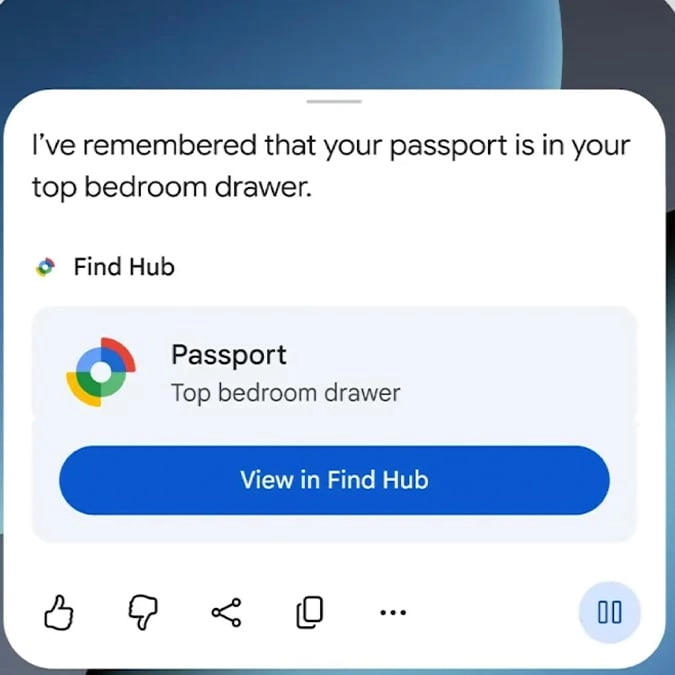
Android can now remember where you left your passport even if there’s no tracker attached


Android has released its September update and it includes a new feature that could make life a lot easier.
This new addition to the operating system is powered by AI and enables you to remember where you’ve placed important things.
All you need to do is ask Google’s Gemini to save the location of your item in the Find Hub so that you’ll know where it is later.
Android explains: “For things you don’t put a tracker tag on, like your passport or a spare key, say something like, ‘Hey Google, remember in Find Hub that I put my passport in my bedroom drawer’, and add an optional photo.
Advert
“When you need to find it, just ask Gemini for its location or check your remembered items tab in Find Hub. Try it on Android 16+ devices in countries where Gemini and Find Hub are supported.”
New features coming to Android with its September update
Android is also introducing other handy features including Motion Assist to help to reduce motion sickness when using your phone from the passenger seat.
This adds a ‘subtle bubble overlay’ to your screen that will move along with the vehicle.
Android goes on to state: “It’s designed to help bridge the gap between what your eyes see and the movement of your ride. Set it to turn on automatically, add it to Quick Settings, and customize the bubble’s shape, color, and opacity to match your style. Try it during your next ride on phones using Android 17.”
You’ll also now be able to share and update lists or notes within your group chats so that everyone can keep up to date.
This means that all members of a chat in Google Messages will be able to view, edit, and add ideas, ‘making it effortless to collaborate on the fly without switching apps’.
For accessibility improvements, the operating system is introducing Guided Vision that is designed to assist the blind and low-vision community.
To use this, simply share your camera in Gemini Live in order to listen to descriptions of what is in front of you, which can be helpful with things like reading fine print on a food label, ordering from a menu in a low-lit restaurant, or identifying household objects.
You can also add the feature to your Accessibility shortcuts, with Guided Vision coming soon to phones running Android 9+ in countries where Gemini is available.