
iPhone user baffled after spotting strange icon in call log linked to NSFW FaceTime calls


One iPhone user spotted an unusual icon on their call log that left them confused.
We've all had those moments where our phones do something unexpected, a strange notification pops up or a warning appears out of nowhere. Luckily, the internet usually has answers, someone somewhere has probably encountered the same thing and asked about it online.
Over the years, Apple has been steadily adding more safeguards to protect users from unwanted or inappropriate content. From filtering explicit messages to blocking suspicious links, the company has been adding layers of protection to iOS over the years.
Advert
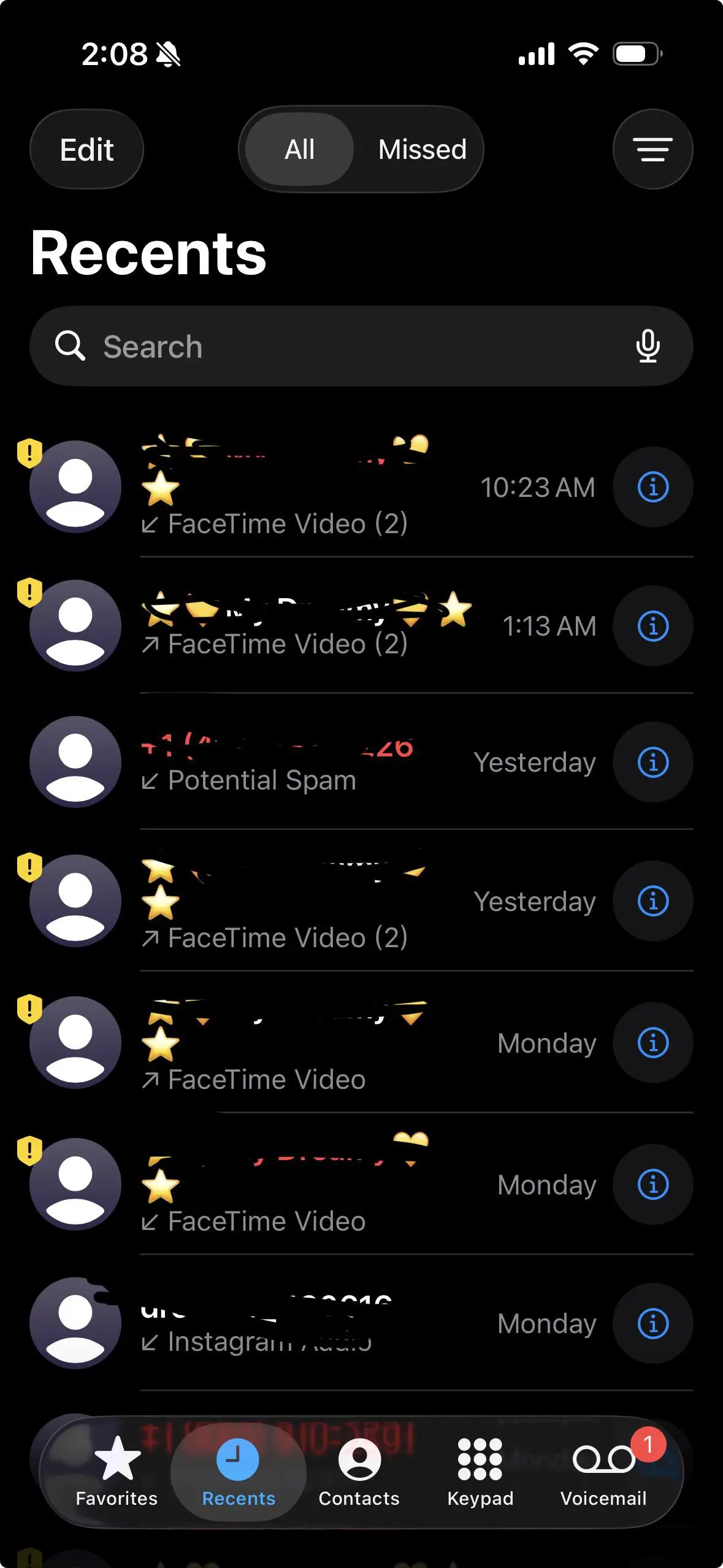
But not everyone is aware that these features exist. Some only discover them by accident, which brings us to one confused iPhone user who turned to Reddit after spotting a peculiar warning symbol in their FaceTime call log.
"What does the yellow exclamation mark thing mean?" they asked on the forum.
Helpful Redditors quickly jumped in to explain: "It means on your last FaceTime with them it detected nudity. You have to call them and it’ll give you a popup asking you if you’re okay and giving you support options.
"Any incoming calls will be automatically declined until you call them."
"The funniest part is me and my partner weren’t doing anything sexual," the bewildered OP replied in the comments.
"I thought you were joking and wondered why this was the top comment. Turns out this is actually the reason! I hadn’t heard of this before," another shocked user chimed in.
According to another commenter, the feature is 'only turned on by default on child accounts,' adding that adult accounts won't see the pop-up 'unless you explicitly turn it on.'
Towards the end of last year, Apple rolled out a Sensitive Content Warning feature designed to help users 'avoid receiving unwanted nude photos or videos on their Apple device.'
According to the tech giant: "When you turn on Sensitive Content Warning, it will be turned on automatically for all supported apps, but you can choose to manage access for each app. When you turn on Sensitive Content Warning on your iPhone, it’s also turned on for your paired Apple Watch."
One user screenshotted in the Reddit thread showing exactly where in Settings you can disable the feature if you find it switched on.
Sensitive Content Warning requires iOS 17 or later, or iPadOS 17 or later, for users to see its effects.
To turn it off, simply go to Settings > Privacy & Security and scroll down to toggle Sensitive Content Warning.