WhatsApp users finally set to get long-awaited feature in upgrade coming to phones next month


You asked for it, and you're finally getting it. WhatsApp boasts an estimated 3.2 billion monthly active users, meaning Meta has a tough job trying to keep everyone happy.
WhatsApp is supposed to be pretty secure thanks to end-to-end encryption, while two-factor authentication can lock your private messages down like Fort Knox. Still, there were recent concerns about how the much-discussed nickname feature could be a cybersecurity nightmare.
Other 2026 updates have added a slew of features like the ability to indefinitely pin messages and add group statuses, but now, scheduled messages are on the way.
The likes of Telegram, Gmail, Google Messages, iMessage, and Slack all allow you to schedule messages for a later date, so many were surprised that it's taken WhatsApp this long.
What are WhatsApp's scheduled messages?
Advert
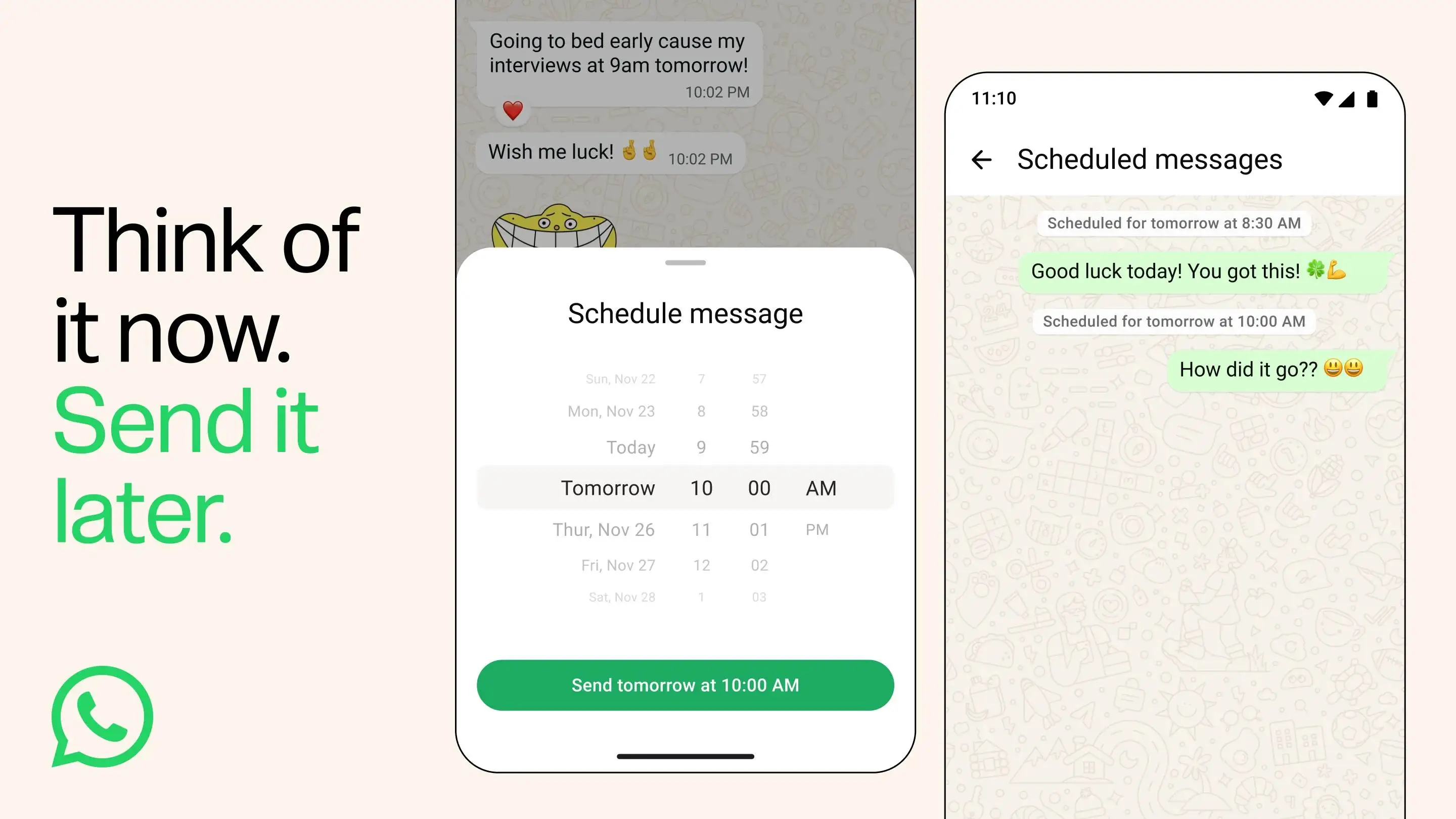
In a blog announcing the update, Meta reiterated that you can "say it at the right time with scheduled messages." Moving forward, WhatsApp users will be able to schedule messages for anywhere between 10 minutes and 14 days before they want them to arrive.
We're sure scheduled messages aren't for everyone, as some would argue that if you have the time to schedule a message, you have the time to send one.
The post explains: "Some messages are better sent a little later. You remember at 11pm to wish someone luck for an exam the next morning, or want a birthday message to land at midnight in your friend's time zone, not yours. You think of it now, but now isn't the right time."
Working with text, photos, and videos, scheduled messages are supposed to be "one more way to show up for the people who matter to you, now at exactly the right time."
It's not just for individual recipients, as scheduled messages can also be used in group chats, making it handy if you need to remind everyone that payment is due for your next group getaway.
How to schedule a message on WhatsApp?
Meta says that to schedule a message, press and hold the send button, then select the day and time you want it to arrive. Even though it will look like any other kind of message to the person receiving it, you'll be able to see all your scheduled messages in a dedicated section.
This means you can delete them if you change your mind.
The best thing is that even if your phone is off, out of network area, or out of battery, scheduled messages will still send. Like all WhatsApp messages, scheduled ones will be end-to-end encrypted and can't even be read by WhatsApp.
Rolling out globally to iOS and Android users "over the coming weeks," there's no exact release date. We're also not told if there will be an opportunity to edit scheduled messages or just delete them completely.
We can think of several reasons why scheduled messages would be handy, particularly if you're prone to forgetting that special's someone's birthday or need to wish them well across different time zones.
Meta claims that scheduled messages are one of the most-requested features it gets for WhatsApp, and even though some might champion the likes of true multi-account switching on iOS or built-in call recording, others are over the Moon that scheduled messages are on the way.