Humans are reading your private ChatGPT logs without you knowing - here is how to opt out


People are being urged to opt out of a ChatGPT feature which allows humans to read through their private conversations with the bot.
The chats you’re having with the AI bot might not be as private as you think as ChatGPT training could involve surveillance from third parties.
This is according to a report by 404Media which shared that internal documents viewed by the publication showed that hundreds of contractors are reading through conversations between users and the chatbot as a training exercise.
What is Project Lily?
This training program involving human reviewers to grade ChatGPT interactions is reportedly known as Project Lily, and has led to growing concerns about cybersecurity while conversing with the bot.
OpenAI has stated on its website that a ‘significant portion’ of the content imputed into its AI bot includes information about individual people, meaning that the company’s training data ‘may incidentally include personal information’.
Advert
The AI firm explained: “We use training data to develop the model’s capabilities - such as prediction, reasoning, and problem-solving - not to build profiles of individuals, contact them, or personalize ads to them.
“In some cases, models may learn from personal information to understand how elements like names and addresses function in language, or to recognize public figures and well-known entities. This helps the model generate more accurate and contextually appropriate responses.”
OpenAI stated that it states active steps to ‘limit the processing’ of personal data during the AI’s training and that information is only retained ‘for as long as reasonably necessary’.
The firm added: “We use training information lawfully. Our foundation models power a wide range of beneficial applications - including accessibility tools, customer support, software development, personalized education, and scientific research. These capabilities depend on large-scale training data, including publicly available information, and information from third-party partners.
“We apply safeguards throughout the training process, including steps designed to reduce the processing of personal information in the training process and to mitigate risks.”
How to turn of ChatGPT Training
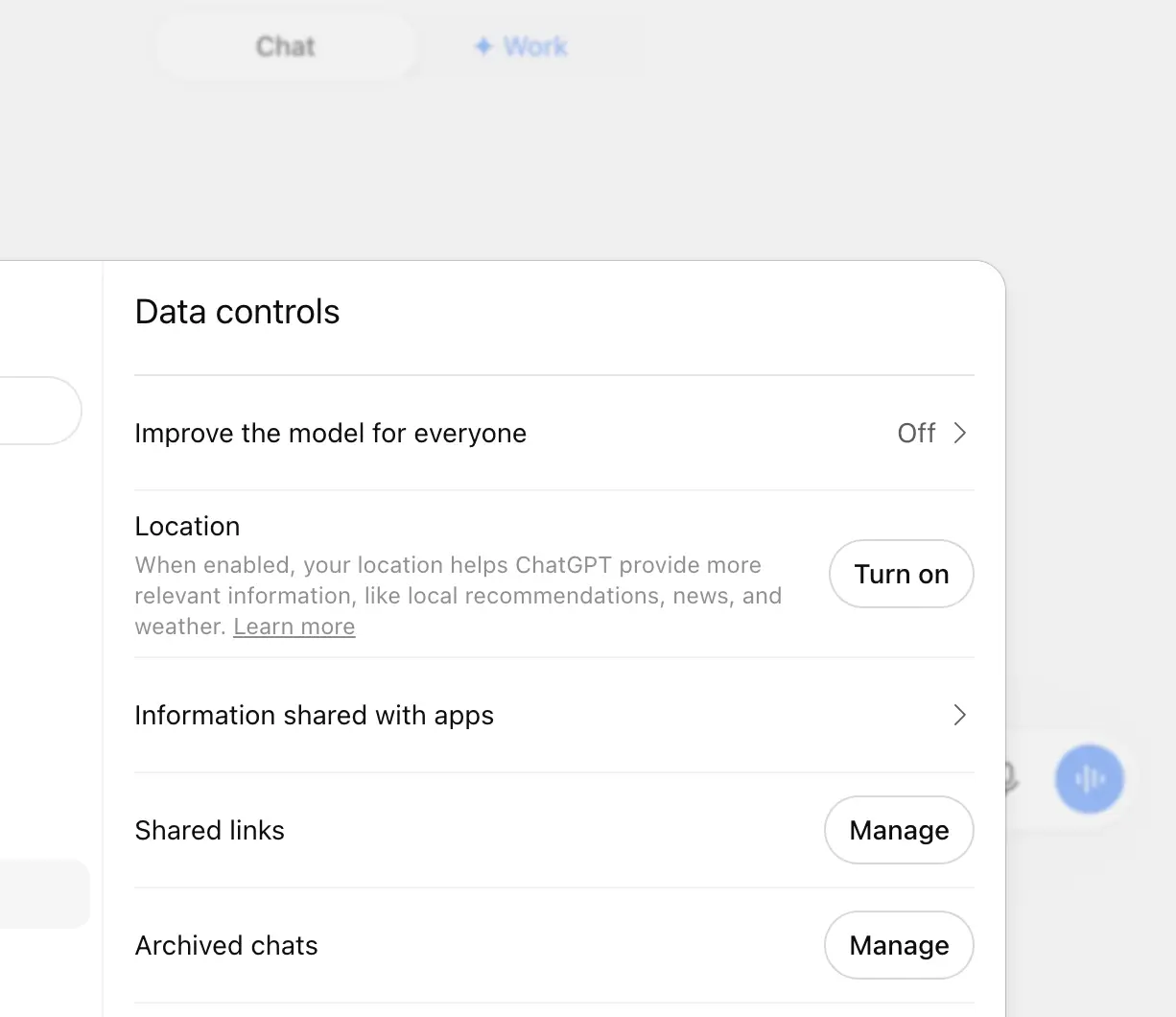
If you want to opt out of the training then there are several ways to do so. First off, if you are signed into your account on a desktop then you’ll need to select your profile icon followed by Settings.
From there, go to Data Controls and make sure the ‘improve the model for everyone’ toggle is switched off.
If you aren’t signed in then click on the ‘?’ icon in the corner of the screen, which will bring up Settings. There, you will be able to turn off the ‘improve the model for everyone’ toggle.
Meanwhile, on a smartphone, you’ll need to open up the menu on the side-bar and select your profile icon.
Like before, click on Data Controls and switch off the ‘improve the model for everyone’ impression.