iPhone users spot iOS 18 detail they 'can't unsee' on their dashboard


iPhone users have been noticing some mildly infuriating issues with their home screen widgets.
The problem went largely unnoticed until one sharp-eyed user caught the bothersome misalignment after installing iOS 18.
On the iOS subreddit, they shared a screenshot of their poorly aligned widgets which would drive any perfectionist crazy. The caption on the discussion thread read: "Anyone else has this alignment problem on ios 18? Restarting or removing widgets didn’t help".
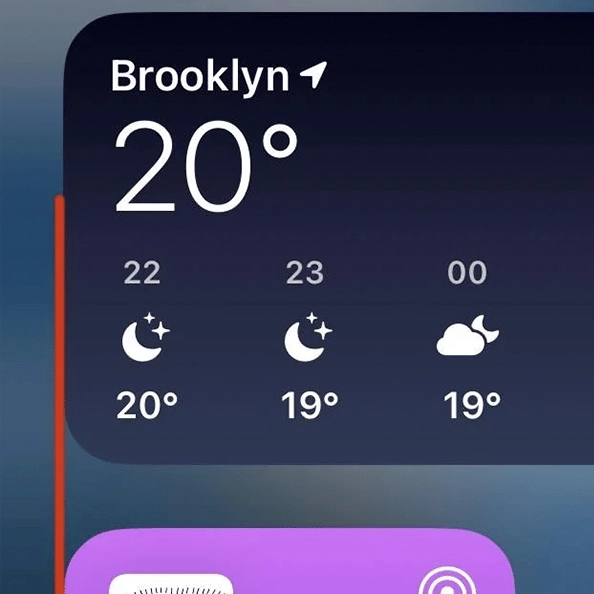
The screenshot showed a large rectangular widget for the weather app above two smaller square widgets, one for a podcast and the other displaying the device's battery status.
Advert
The user added two thin red vertical lines to highlight how the edges of the rectangular widgets don’t line up properly with the square ones below - presuming it's an error as a result of iOS 18.
Some people who didn't see it initially now wish they could 'un-see' it.
"I didn’t until you pointed it out.
Make me un-see it!!!," wrote one user.
"Oh my god I hate that I can't unsee it now," wrote another.
"I literally checked to see after reading this. And now I’m slightly triggered every time I swipe left…," another comment agreed.
"I could have lived my life not knowing this," someone else remarked.
Others have criticised Apple's UI design as of late, calling iOS 18 'Definitely the worst UI update I’ve ever seen'.
"iOS's USP was design. The current iOS is just sh**, to put it mildly. Unintuitive, unaesthetic, and not useful at all. Just look at the Home widget font being cut off in normal mode vs in edit mode," another user added, sharing a screenshot of their home screen showing the cut-off text.
However, one iPhone user seemed to suggest a solution: "It seems the only way to fix that is to have your icon size set as large. I’ve got mine set as the square widgets for the time being because I can’t unsee it now".
This issue only seems to occur on the widget page, which is the leftmost home screen, rather than on the edit widget page suggesting that it might be a technical glitch on Apple’s end.
Since the release of iOS 18, users have been reporting glitches in the Messages app and problems with deleting large files in the Photos app, feeling somewhat forced to purchase an iCloud subscription.
Others have reported issues with their mobile's battery health after installing the latest software update.