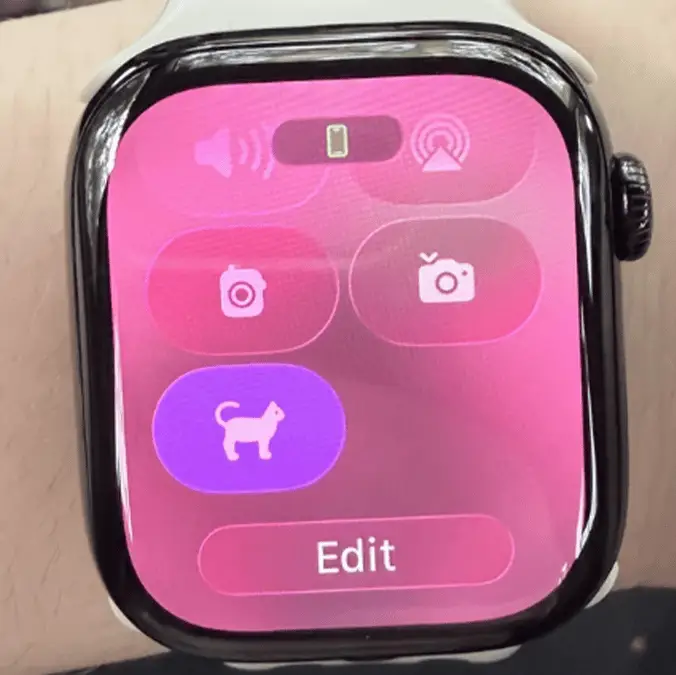
Apple Watch user baffled after finding 'kitten mode' feature hiding in her apps


Apple Watches have evolved a lot since they were first introduced into the ecosystem back in 2015, causing people to still discover new ways to use the device and fresh tricks to take advantage of.
The utility of an Apple Watch for most users doesn't extend much further than telling the time, getting notifications, and tracking your health data — but the wearable device actually has far more that it can offer you if you know where to look.
For example, you can set up a remote feed for your phone's camera on your Apple Watch, making otherwise tricky shots far easier to capture, and you can even prevent yourself from becoming lost on a hike by laying down a digital breadcrumb trail using BackTrack in the Compass app.
Some things still mystify even the most experienced Apple users, however, and one particular feature has left people on Reddit in a rut with no conceivable answer in sight.
Advert
Shared by u/Agitated-Blood-3222 on the r/AppleWatch subreddit, a new popular post asked the community what the 'kitten feature' on their Apple Watch was designed for, and why they were unable to turn it off.
"I am genuinely SO confused as to what this is," the post begins. "I got the watch about two weeks ago and haven't used it every day, and haven't done anything other than delete a few apps on it to clean up the main screen.
"Every time I try to turn the 'kitten' feature off it turns itself back on, and when I tried Googling it, I got absolutely nothing," they added, with the post serving as a desperate cry for help.
Attached to the post is an image of the so-called 'kitten mode', with a cat icon button found within the shortcuts page that's unable to be disabled.
One of the first things that often comes to your mind in situations like this – especially if you can't find a way to turn something off – is a cybersecurity threat, as hackers can place software on devices that hijack and even completely lock off access, leaving the device compromised.
Thankfully in this situation that's far from the case, as the original poster quickly discovered the truth behind the odd button.
"SOLVED!! I use an app caused iScreen for cute widgets on my lock screen and it actually is connected to my watch and allows you to add cute images to your shortcut page!! Thanks for everyone's interest!!"
It goes to show quite how connected your iPhone and Apple Watch can be in actuality, linking up even when you didn't quite realise it to provide customisation you didn't think was possible.
What this post has allowed is for people to add the 'kitten mode' to their own devices, as it's proven to be an incredibly popular addition despite not actually doing anything to the gadget.