WhatsApp urges all users to check this key setting immediately


A new scam has a lot of WhatsApp users worrying if they might have fallen victim to it, and there is a simple way to find out.
This comes after a link to a fake WhatsApp webpage was sent out via text to people where they were asked to cast a vote in an online poll.
Once on the fake page, the user is asked to verify their account - which is how their login details and personal information is being collected.
While this might sound like an obvious scam to many social media savvy people, the kicker is that the text tends to come from someone already in your contacts, who has likely already fallen victim to the scam. It will ask you for your support in voting for them in an online contest.
Advert
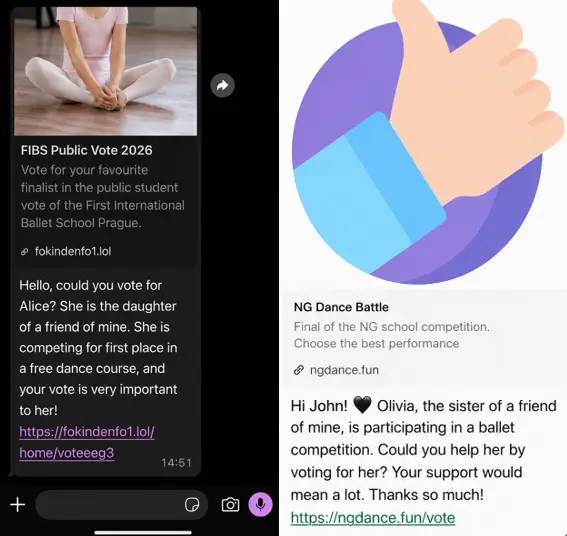
However, what you’re actually doing is unknowingly authorized a new linked device, meaning that the scammer will now be able to access your WhatsApp account.
WhatsApp scam is sent from someone in your contacts list
Now, a cybersecurity company is urging people who think they might have been affected to check a specific setting immediately.
Tech firm Malwarebytes posted a statement to their website to alert people to the scam, and offer vital advice on what to do next.
On the page, it explains: “Because this doesn’t involve a traditional login, there are no obvious signs like password reset emails or failed login alerts. The attacker’s device simply appears as another linked session on your account.
“Unless you check your linked devices, the compromise can go unnoticed for quite some time.”
Check this WhatsApp setting to see if you’ve been scammed
According to Malwarebytes, these types of scams rely on people misplacing their trust but there are a few ways you can take extra precautions which could make all the difference.
First off, the company advises people to take extra care when receiving ‘unexpected requests’, even if the message is from someone on your contacts list.
The site continues: “Don’t click unexpected links, especially if you’re immediately asked to verify, connect, or link your WhatsApp account.
“Never follow instructions to link devices or scan QR codes unless you initiated the action yourself.”

It is also advised to check one particular setting within the WhatsApp app to make sure your account isn’t linked to anyone else.
In order to do this, first head to the Settings within the app before selecting Linked Devices.
From there, you’ll be able to view all devices that currently have access to your account and you’ll be able to log out of any that you don’t recognize.
Malwarebytes adds: “Enable two-step verification in WhatsApp for an extra layer of protection. If a message feels off, verify it with the sender through another channel before acting.
“Malwarebytes Scam Guard can also help spot scams like this. It’s included with the Malwarebytes Mobile Security app for Android and iPhone.”